
Introduction
This tutorial provides a comprehensive guide to understanding CORS, its underlying mechanisms, and practical implementation strategies within Spring Boot, specifically tailored for beginners.
CORS is the acronym for Cross-Origin Resource Sharing. By default, web browsers enforce the Same-Origin Policy, which restricts a webpage from making requests to domains other than the one that served the page. CORS provides a way to safely bypass this restriction, allowing controlled cross-domain requests.
Note that non-conforming clients such as a mobile app, an httpClient or curl, do not have the Same-Origin Policy and consequently will not activate CORS on the server side.
Prior to the Same-Origin Policy, malicious scripts could steal user data or make requests to third party applications impersonating the currently logged in user. The browsers used the Same-Origin Policy to mitigate these attacks but also prevented legitimate requests. CORS comes in as a safe way to punch holes into that policy.
Understanding the CORS Mechanism
The CORS standard operates by introducing new HTTP headers that facilitate hole punching in the Same-Origin Policy. This process involves the browser sending its origin details (scheme, domain, and port) with the request, and the server responding with specific CORS headers to grant or deny access.
An “origin” is uniquely identified by three components:
- Scheme (Protocol): Such as http or https.
- Domain (Host): The hostname, like http://www.example.com
- Port: The port number, such as 8080 or 443.
Any difference in these three elements constitutes a cross-origin request.
CORS requests are categorized into two main types, which the browser determines based on the request’s characteristics:
Simple Requests
A “simple request” is a cross-origin HTTP request that does not require a prior “preflight” check from the browser. These requests are considered safe because they generally do not have significant side effects on server data. To qualify as a simple request, an HTTP request must meet all of the following conditions:
- It must use one of the allowed HTTP methods: GET, HEAD, or POST.
- It can only include CORS-safelisted request headers, such as Accept, Accept-Language, Content-Language, or Content-Type.
- If a Content-Type header is used, its value must be one of application/x-www-form-urlencoded, multipart/form-data, or text/plain.
- No event listeners are registered on any XMLHttpRequestUpload object.
If a request meets these criteria, the browser sends the actual request directly, including an Origin header. The server then responds with the Access-Control-Allow-Origin header, indicating whether the requesting origin is permitted to access the resource. If the Origin header matches the Access-Control-Allow-Origin header in the response, the browser allows the frontend JavaScript to access the response. If the headers CORS headers (like Access-Control-Allow-Origin) are missing, the browser rejects the response and shows a CORS error in the console.
Below is an example simple request and a response:
### Request ###
GET /api/data HTTP/1.1
Host: backend.example.com:8080
User-Agent: Mozilla/5.0 (Windows NT 10.0; Win64; x64; rv:126.0) Gecko/20100101 Firefox/126.0
Accept: application/json
Accept-Language: en-US,en;q=0.5
Accept-Encoding: gzip, deflate, br
Origin: http://frontend.example.com
Connection: keep-alive
Referer: http://frontend.example.com/
Pragma: no-cache
Cache-Control: no-cache

### Response ###
HTTP/1.1 200 OK
Content-Type: application/json;charset=UTF-8
Content-Length: 42
Connection: keep-alive
Access-Control-Allow-Origin: http://frontend.example.com
Date: Fri, 23 May 2025 12:04:00 GMT

{"message": "Data fetched successfully from backend"}
Explanation:
- Request:
GET /api/data HTTP/1.1: A simple GET request.Origin: http://frontend.example.com: Indicates the origin of the requesting page.
- Response:
HTTP/1.1 200 OK: Standard successful HTTP response.Access-Control-Allow-Origin: http://frontend.example.com: The server explicitly allows requests fromhttp://frontend.example.com.
Preflighted Requests
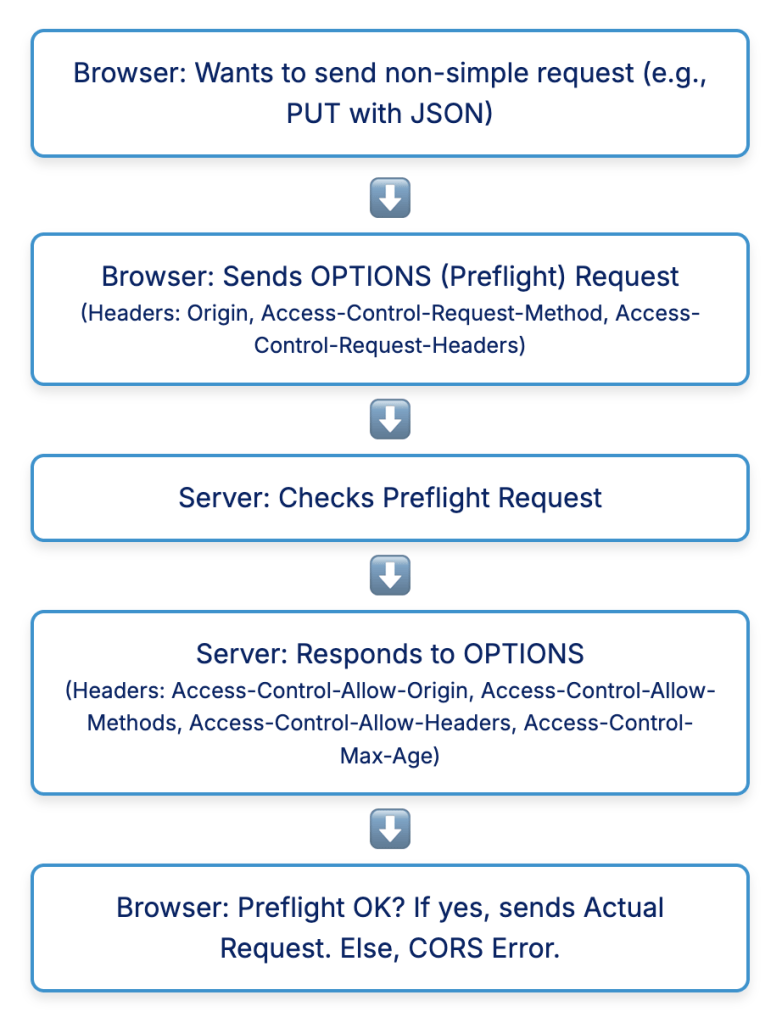
Unlike simple requests, “preflighted requests” involve an initial OPTIONS HTTP request sent by the browser to the server before the actual request. This preliminary probe, known as a preflight request, is crucial for methods that can cause side-effects on server data (e.g., PUT, DELETE), or when the request includes custom headers or non-safelisted Content-Type values.
The browser sends this OPTIONS request to determine if the actual request is safe to send. The preflight request includes headers like Access-Control-Request-Method (indicating the intended HTTP method) and Access-Control-Request-Headers (listing any custom headers that will be used in the actual request). The server then responds with its own CORS headers, such as:
- Access-Control-Allow-Origin: Specifies the allowed origin(s).
- Access-Control-Allow-Methods: A comma-separated list of HTTP methods the server permits.
- Access-Control-Allow-Headers: A comma-separated list of custom headers the server permits.
- Access-Control-Max-Age: Indicates how long (in seconds) the preflight response can be cached by the browser, reducing the number of subsequent OPTIONS requests.
If the server’s response to the preflight request indicates that the actual request is allowed, the browser proceeds to send the real request. If not, the browser blocks the request, and a CORS error occurs. This two-step process ensures that servers can examine potentially impactful requests before they are executed, protecting unconsenting servers from unintended side effects. This design choice also makes CORS backward compatible, as older servers not explicitly handling CORS will simply not respond with the necessary headers, causing the browser to block the request, effectively preserving the Same-Origin Policy for them.
Below is an example preflighted request, the real request and their responses.
### Preflight Request (OPTIONS) ###
OPTIONS /api/resource HTTP/1.1
Host: backend.example.com:8080
User-Agent: Mozilla/5.0 (Windows NT 10.0; Win64; x64; rv:126.0) Gecko/20100101 Firefox/126.0
Accept: */*
Accept-Language: en-US,en;q=0.5
Accept-Encoding: gzip, deflate, br
Origin: http://frontend.example.com
Access-Control-Request-Method: PUT
Access-Control-Request-Headers: Content-Type, Authorization
Connection: keep-alive
Referer: http://frontend.example.com/edit
Pragma: no-cache
Cache-Control: no-cache

### Preflight Response ###
HTTP/1.1 204 No Content
Date: Fri, 23 May 2025 12:08:00 GMT
Access-Control-Allow-Origin: http://frontend.example.com
Access-Control-Allow-Methods: PUT, DELETE, POST, GET, OPTIONS
Access-Control-Allow-Headers: Content-Type, Authorization
Access-Control-Max-Age: 86400
Connection: keep-alive

### Actual Request (if preflight is successful) ###
PUT /api/resource HTTP/1.1
Host: backend.example.com:8080
User-Agent: Mozilla/5.0 (Windows NT 10.0; Win64; x64; rv:126.0) Gecko/20100101 Firefox/126.0
Accept: application/json
Accept-Language: en-US,en;q=0.5
Accept-Encoding: gzip, deflate, br
Content-Type: application/json
Authorization: Bearer abcdef12345
Origin: http://frontend.example.com
Content-Length: 35
Connection: keep-alive
Referer: http://frontend.example.com/edit
Pragma: no-cache
Cache-Control: no-cache

{"data": "updated content"}

### Actual Response ###
HTTP/1.1 200 OK
Content-Type: application/json;charset=UTF-8
Content-Length: 58
Connection: keep-alive
Access-Control-Allow-Origin: http://frontend.example.com
Date: Fri, 23 May 2025 12:08:01 GMT

{"message": "Resource updated successfully on the backend"}
Explanation:
- Preflight Request (OPTIONS):
OPTIONS /api/resource HTTP/1.1: The preflight request uses theOPTIONSmethod.Origin: http://frontend.example.com: The origin of the actual request.Access-Control-Request-Method: PUT: Indicates that the actual request will use thePUTmethod.Access-Control-Request-Headers: Content-Type, Authorization: Lists the custom headers the actual request will include.
- Preflight Response:
HTTP/1.1 204 No Content: A successful preflight response often returns a204 No Contentstatus.Access-Control-Allow-Origin: http://frontend.example.com: The server allows requests from this origin.Access-Control-Allow-Methods: PUT, DELETE, POST, GET, OPTIONS: The server allows these HTTP methods for cross-origin requests to this resource.Access-Control-Allow-Headers: Content-Type, Authorization: The server allows these headers in the actual cross-origin request.Access-Control-Max-Age: 86400: The browser can cache the preflight response for 86400 seconds (24 hours).
- Actual Request (PUT): This is sent only if the preflight response is successful.
PUT /api/resource HTTP/1.1: The actual request with the intended method.- Includes
Content-TypeandAuthorizationheaders as indicated in the preflight request.
- Actual Response: The server’s response to the actual
PUTrequest. It also includesAccess-Control-Allow-Origin.
Credentialed Requests
By default, cross-origin requests do not include “credentials” such as cookies, HTTP authentication headers, or TLS client certificates. However, CORS allows for “credentialed requests” if both the client-side request includes a flag to send credentials (e.g., withCredentials = true for XMLHttpRequest or fetch) and the server explicitly permits it by including the Access-Control-Allow-Credentials: true header in its response. This is a critical security consideration, as allowing credentials cross-origin can increase the attack surface if not handled carefully.
Configuring CORS in Spring Boot: Practical Examples
Spring Boot offers flexible and robust mechanisms to configure CORS, catering to various application needs, from fine-grained control over specific endpoints to broad, application-wide policies.
Using @CrossOrigin Annotation
The @CrossOrigin annotation provides a convenient way to enable CORS for specific controller classes or individual handler methods. This approach is ideal when different parts of an API require distinct CORS policies.
Class-Level Configuration
When applied at the class level, @CrossOrigin enables CORS for all handler methods within that controller.
@CrossOrigin(origins = "http://localhost:5173", maxAge = 3600)
@RestController
@RequestMapping("v1/api")
public class ExpenseController {

    @GetMapping("/expenses")
    public List<ExpenseDto> fetchLatestExpenses() {
        final List<Expense> expenses = expenseService.findTop10Expenses();
        return expenseMapper.toExpenseDtos(expenses);
    }

}
In this example, all endpoints under v1/api (e.g., /api/expenses) will allow requests originating from http://localhost:5173. The maxAge parameter tells the browser to cache the preflight response for 3600 seconds (1 hour).
Method-Level Configuration
The @CrossOrigin annotation can also be applied to individual methods, overriding any class-level configuration or providing unique CORS rules for that specific endpoint.
@RestController
@RequestMapping("v1/api")
public class ExpenseController {
    @CrossOrigin(origins = "http://localhost:5173", maxAge = 3600)
    @GetMapping("/expenses")
    public List<ExpenseDto> fetchLatestExpenses() {
        final List<Expense> expenses = expenseService.findTop10Expenses();
        return expenseMapper.toExpenseDtos(expenses);
    }

}
Here, only the fetchLatestExpenses method will accept requests from http://localhost:5173. Every other method in the class, without its own @CrossOrigin would still be subject to the Same-Origin Policy.
The @CrossOrigin annotation supports various parameters to fine-tune CORS behavior, including origins (allowed origins), methods (allowed HTTP methods), allowedHeaders (allowed request headers), exposedHeaders (headers exposed to the client), allowCredentials (whether credentials are allowed), and maxAge (preflight cache duration). By default, @CrossOrigin without parameters allows all origins and HTTP methods specified in the @RequestMapping.
Global CORS Configuration with WebMvcConfigurer
For broader, application-wide CORS settings, implementing the WebMvcConfigurer interface is a common and recommended approach. This method allows for centralized management of CORS rules across multiple URL patterns.
@Configuration
@EnableWebMvc // Required for WebMvcConfigurer to take effect in some Spring Boot versions
public class WebConfig implements WebMvcConfigurer {

    @Override
    public void addCorsMappings(CorsRegistry registry) {
        registry.addMapping("/api/**") // Apply CORS to all paths under /api/
                .allowedOrigins("http://localhost:5173", "http://some/other/host.com") // Specific allowed origins
                .allowedMethods("GET", "POST", "PUT", "DELETE", "OPTIONS") // Allowed HTTP methods
                .allowedHeaders("*") // Allows all headers from the client
                .allowCredentials(true) // Allows sending of cookies, authorization headers etc.
                .maxAge(3600); // Cache preflight response for 1 hour
    }

}
This configuration applies to all API endpoints under /api/**. It explicitly whitelists http://localhost:5173 and http://some/other/host.com as allowed origins, permits common HTTP methods, allows all request headers, and enables credential sharing. The maxAge setting optimizes performance by caching preflight responses. When combining global and local (@CrossOrigin) configurations, the rules are generally additive for attributes like origins, methods, and headers. However, for attributes where only a single value is accepted (e.g., allowCredentials, maxAge), the local configuration overrides the global one.
Configuring CORS with CorsFilter
In scenarios where the frontend and backend are deployed separately, and especially when Spring Security is involved, it can be beneficial to configure CORS using a CorsFilter. This ensures that CORS processing occurs early in the request lifecycle, before other security filters that might otherwise block cross-origin requests prematurely.
Additionally, you may choose to make the configuration environment specific by putting the config in your application.yaml file. Configure cors in your yaml file (The below could be in the application-dev.yaml file)
custom:
  cors:
    allowed-origins: 'http://localhost:5173,https://localhost:5174,http://localhost:5175'
    allowed-methods: '*'
    allowed-headers: '*'
    allow-credentials: true
    max-age: 3600
Now, declare your Cors filter as a bean and inject the config as shown below. The below is done in a class annotated with “@Configuration”
    @Bean
    @ConfigurationProperties(prefix = "custom.cors")
    public CorsConfiguration corsConfiguration() {
        return new CorsConfiguration();
    }

    @Bean
    public CorsFilter corsFilter(CorsConfiguration config) {
        UrlBasedCorsConfigurationSource source = new UrlBasedCorsConfigurationSource();
        if (!CollectionUtils.isEmpty(config.getAllowedOrigins()) || !CollectionUtils.isEmpty(config.getAllowedOriginPatterns())) {
            source.registerCorsConfiguration("/api/**", config);
            source.registerCorsConfiguration("/authenticate", config);
            source.registerCorsConfiguration("v1/api/**", config);
            source.registerCorsConfiguration("/actuator/**", config);
        }
        return new CorsFilter(source);
    }
This method is particularly useful when dealing with complex security setups, as it ensures CORS is handled at the filter level.
Enabling CORS with Spring Security
If your Spring Boot application incorporates Spring Security, you must explicitly enable CORS within your security configuration. Spring Security’s default behavior might otherwise block legitimate cross-origin requests before they reach your CORS configuration.
public class SecurityConfig {

    private final CorsFilter corsFilter;
    private final CorsConfiguration corsConfiguration;

    public SecurityConfig(CorsFilter corsFilter, CorsConfiguration corsConfiguration) {
        this.corsFilter = corsFilter;
        this.corsConfiguration = corsConfiguration;
    }

    /**
     * Configures the security filter chain with CORS support
     *
     * @param http the HttpSecurity to configure
     * @return the configured SecurityFilterChain
     * @throws Exception if an error occurs during configuration
     */
    @Bean
    public SecurityFilterChain securityFilterChain(HttpSecurity http) throws Exception {
        // Enable CORS and disable CSRF
        http.cors(cors -> cors.configurationSource(request -> corsConfiguration))
            .csrf(csrf -> csrf.disable());

        // Configure authorization rules
        http.authorizeHttpRequests(authorize -> authorize
                .anyRequest().authenticated());

        // Add the CORS filter before the UsernamePasswordAuthenticationFilter
        http.addFilterBefore(corsFilter, UsernamePasswordAuthenticationFilter.class);

        return http.build();
    }
}
The http.cors(cors -> cors.configurationSource(request -> corsConfiguration)) line within the SecurityFilterChain configuration is essential to enable CORS within the Spring Security filter chain. This ensures that Spring Security cooperates with your CORS settings, allowing cross-origin requests to be processed correctly.
Common CORS Errors and Effective Troubleshooting
CORS errors typically occur when a web application attempts to access data from another domain without the necessary permissions. Understanding the common causes and employing systematic debugging strategies can significantly streamline the troubleshooting process.
| Error Message (Browser Console) | Likely Cause | Immediate Solution/Configuration Adjustment |
| No ‘Access-Control-Allow-Origin’ header is present… | Server not sending Access-Control-Allow-Origin header, or origin mismatch. | Ensure allowedOrigins in Spring Boot configuration includes the client’s origin. |
| Preflight request failed:… | Server denied the OPTIONS preflight request. | Check allowedMethods and allowedHeaders in Spring Boot configuration to ensure they permit the actual request’s method and headers. |
| Access to XMLHttpRequest at ‘…’ from origin ‘…’ has been blocked by CORS policy: Response to preflight request doesn’t have HTTP ok status. | Server returned a non-200 status for the OPTIONS request. | Verify server-side configuration for OPTIONS requests; ensure no other filters are blocking it. |
| Credential is not supported if the CORS header ‘Access-Control-Allow-Origin’ is ‘*’ | Client sent credentials, but server responded with Access-Control-Allow-Origin: *. | Either remove withCredentials from client request or change server’s allowedOrigins to a specific origin and set allowCredentials(true). |
| Did not find method in CORS header ‘Access-Control-Allow-Methods’ | The HTTP method used by the client is not in the server’s Access-Control-Allow-Methods header. | Add the required method (e.g., PUT, DELETE) to allowedMethods in Spring Boot configuration. |
| Invalid token ‘xyz’ in CORS header ‘Access-Control-Allow-Headers’ | Client sent a custom header not listed in server’s Access-Control-Allow-Headers. | Add the custom header (e.g., Authorization, X-Custom-Header) to allowedHeaders in Spring Boot configuration. |
Conclusion
We delved into the foundational concepts of CORS, starting from the browser’s inherent Same-Origin Policy and progressing through the critical role of preflight requests, which act as preliminary handshakes to ensure server consent. We highlighted the specific HTTP headers that govern this cross-origin communication, providing a clear picture of the protocol’s inner workings. Furthermore, we had a solid grasp of Spring Boot’s flexible configuration options, demonstrating the granular control provided by the @CrossOrigin annotation, the centralized management capabilities of WebMvcConfigurer, and the crucial integration considerations when Spring Security is part of the application’s architecture.
 Code Major
Leave a comment